Merging & Splitting Cells
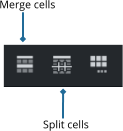
Select multiple cells and click the Merge button on the InfoBar, to merge them into a single cell.
For example you can easily add a header row to a table by selecting all the cells in the first row and merging them into a single cell.
To unmerge/split cells again, select them and click the Split button.
Copyright © Xara